> ## Documentation Index
> Fetch the complete documentation index at: https://docs.invup.me/llms.txt
> Use this file to discover all available pages before exploring further.
# Define your services
> The library of work types you sell, and the rates that ride on them.
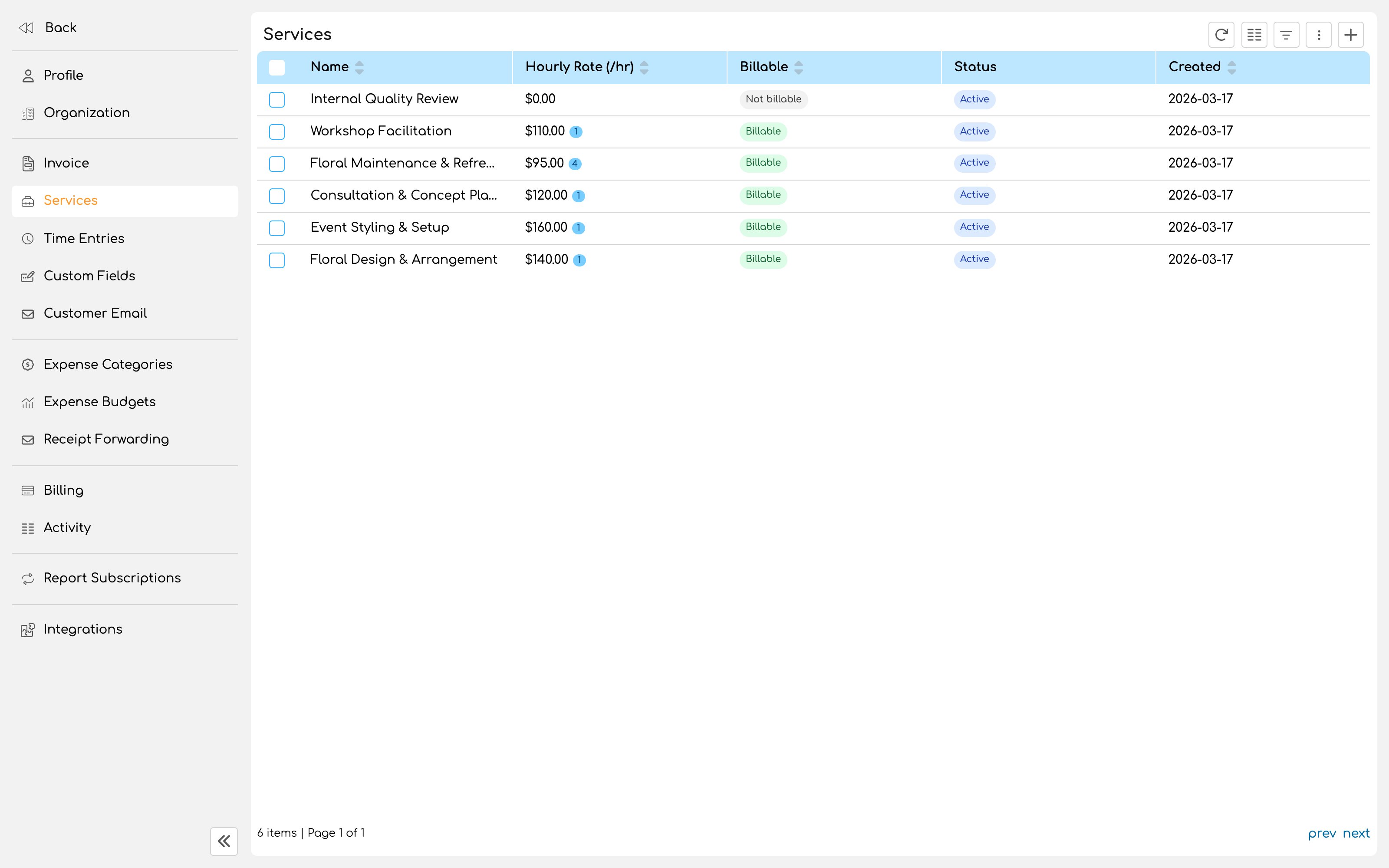
A service describes **the kind of work being done**, not who is doing it. Legal research. Site visit. Copywriting. Discovery workshop. Expert testimony.
Services live in one organization wide library. You attach the ones that apply to each project, which means a service defined once can carry different rates on different engagements without being redefined.
Services are optional. A business that bills a single rate for everything can skip them entirely and set rates on projects instead. Introduce services when you need to bill different kinds of work differently, or report on where time actually went.
 ## Create a service
Service names surface on invoices when you group line items by service, so they are client facing language, not internal shorthand.
"Discovery workshop" reads better on a bill than "DW phase 1".
Optional, and useful when several services are close enough that a colleague might pick the wrong one.
This is the service's base rate, sitting fourth in the rate chain. It applies when nothing more specific has been set for the project or the person.
See [Rates](/setup/rates) for how the chain resolves.
Billable services bill at their resolved rate. Non billable services do not.
## Non billable services
Marking a service non billable is absolute. Time logged against it resolves to zero regardless of every other rate you have set anywhere, and no rate further down the chain can override it.
That makes non billable services the clean way to track work you want visible but never charged: internal admin, business development, pro bono work, rework you have decided to absorb.
The time is still recorded, still reportable, and still shows in the effort a project consumed. It simply carries no value.
## Member rate overrides
A service can carry different rates for different people. A partner's hour of legal research is not priced the same as an associate's.
Set overrides on the service, choosing the members who should have their own rate for it. The override beats both the service's base rate and that person's own base rate.
Setting a rate override does not restrict who can use the service. Everyone can still log against it; the override only changes what those people's time is worth.
## Archiving instead of deleting
Archive a service you have stopped selling. It disappears from the pickers where new work is logged, while every historical entry that used it stays intact and readable.
Deleting is only possible for a service with no time entries against it. Once work has been logged against a service, Invup will not let you delete it, because doing so would strand history.
## How many services to define
Start with between three and eight. Enough to distinguish work that is genuinely priced or reported differently, few enough that the person logging time picks the right one without thinking hard.
A list of forty services is a list nobody uses accurately, and inaccurate service data is worse than none because it looks trustworthy on a report.
## Next
How Invup decides what an hour is worth.
Attach services to real work.
## Create a service
Service names surface on invoices when you group line items by service, so they are client facing language, not internal shorthand.
"Discovery workshop" reads better on a bill than "DW phase 1".
Optional, and useful when several services are close enough that a colleague might pick the wrong one.
This is the service's base rate, sitting fourth in the rate chain. It applies when nothing more specific has been set for the project or the person.
See [Rates](/setup/rates) for how the chain resolves.
Billable services bill at their resolved rate. Non billable services do not.
## Non billable services
Marking a service non billable is absolute. Time logged against it resolves to zero regardless of every other rate you have set anywhere, and no rate further down the chain can override it.
That makes non billable services the clean way to track work you want visible but never charged: internal admin, business development, pro bono work, rework you have decided to absorb.
The time is still recorded, still reportable, and still shows in the effort a project consumed. It simply carries no value.
## Member rate overrides
A service can carry different rates for different people. A partner's hour of legal research is not priced the same as an associate's.
Set overrides on the service, choosing the members who should have their own rate for it. The override beats both the service's base rate and that person's own base rate.
Setting a rate override does not restrict who can use the service. Everyone can still log against it; the override only changes what those people's time is worth.
## Archiving instead of deleting
Archive a service you have stopped selling. It disappears from the pickers where new work is logged, while every historical entry that used it stays intact and readable.
Deleting is only possible for a service with no time entries against it. Once work has been logged against a service, Invup will not let you delete it, because doing so would strand history.
## How many services to define
Start with between three and eight. Enough to distinguish work that is genuinely priced or reported differently, few enough that the person logging time picks the right one without thinking hard.
A list of forty services is a list nobody uses accurately, and inaccurate service data is worse than none because it looks trustworthy on a report.
## Next
How Invup decides what an hour is worth.
Attach services to real work.